
Overview
For the VMware Horizon View connector, we call the installed vmware-view.exe executable with the appropriate resource, server, and authentication parameters, and monitor the resulting process. Below is a breakdown of the parameters used:
-
Resource: Specifies the resource (virtual desktop or application) that the user wants to access.
-
Server: Specifies the server address or hostname of the VMware Horizon View server.
-
Authentication Parameters: Include credentials or authentication tokens required to authenticate the user and establish a secure connection.
If your VMware View client is not included in your System Path variable, you need to provide the explicit path. Typically, the path is as follows:
-
For 64-bit versions of VMware View client: C:\Program Files\VMware\VMware Horizon View Client\vmware-view.exe
-
For 32-bit versions of VMware View client: C:\Program Files (x86)\VMware\VMware Horizon View Client\vmware-view.exe
Ensure to verify the installation directory on your system and adjust the path accordingly when specifying it.
Configuring the VMware Horizon View Connector
In Login Enterprise, the VMware Horizon View connector supports the following parameters:
|
Field |
Description |
|
Server URL |
The View Server for the connection. |
|
Resource |
The resource name visible to end users. |
|
Connection command line |
The path and parameters used by the VMware View executable. See Connection Command Line for more information. Note: A default command line is generated automatically. |
|
Accounts |
Select from previously configured Account Groups or all Accounts. |
|
Launchers |
Select from previously configured Launcher Groups or all Launchers. |
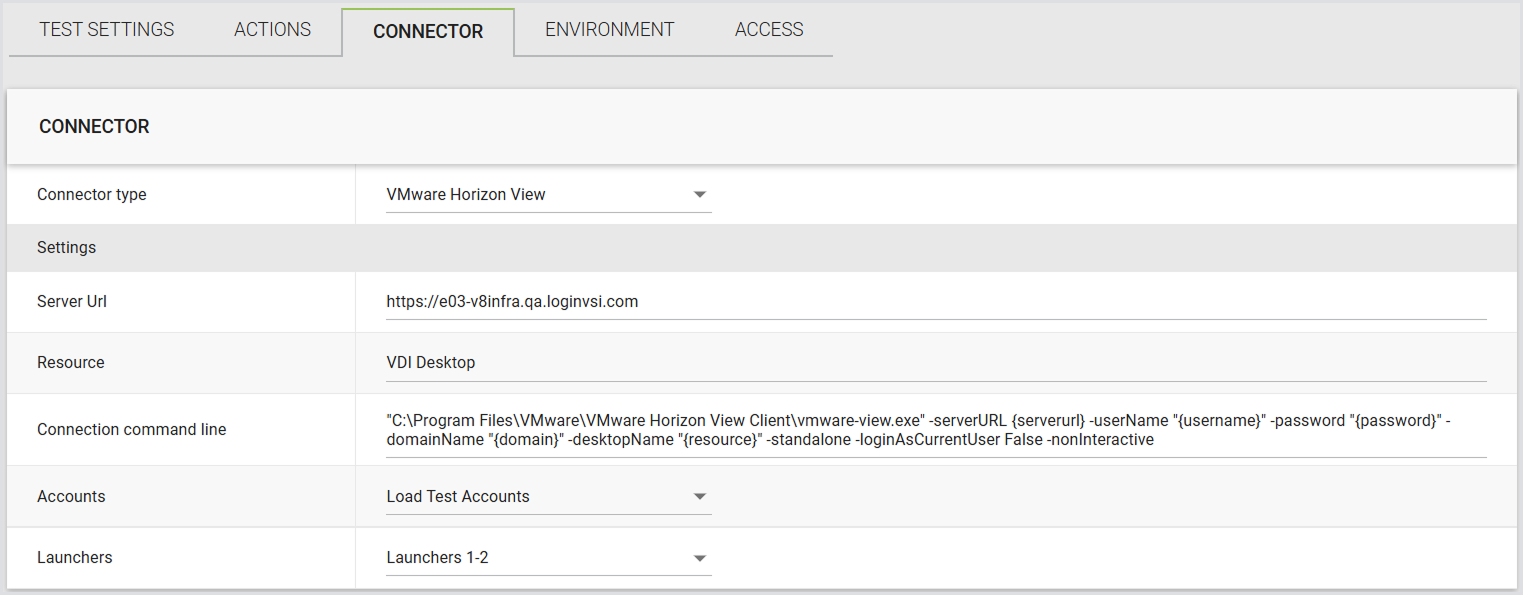
Additionally, you can incorporate all accepted parameters for the Horizon View Client. For further details, see the VMware View Connector Reference.
Connection Command Line
The following variables are commonly used in the connection command line for the VMware Horizon View connector. The available connection command line options are controlled by the VMware client itself. If you need to set additional options, see the Omnissa documentation.
|
Field |
Description |
|---|---|
|
serverurl |
The URL address of the server to connect to |
|
username |
The username field from the selected account |
|
password |
The plain-text password from the selected account |
|
domain |
The domain field from the selected account |
|
resource |
The “Resource” field from the custom connector configuration |
|
customX |
The Custom1 to Custom5 fields configured within the Account record |
|
SecureCustomX |
The Secure Custom1 to Secure Custom5 fields configured within the Account record |