
Overview
OpenID Connect (OIDC) is an authentication protocol used for Single Sign-On (SSO). It allows users to authenticate through an external identity provider (IdP). Login Enterprise relies on the IdP to verify user identity and then uses LDAP for authorization.
Prerequisites
-
An LDAP configuration is in place. For more information, see Configuring Authentication.
-
LDAP credentials are available.
-
These credentials are optional when saving the LDAP configuration without SSO.
-
These credentials are required when SSO is enabled to query user and group information for role assignment.
-
-
A Microsoft Entra tenant (or other OIDC-compatible identity provider) is available.
-
An application is registered in the identity provider.
Configuring OIDC in Microsoft Entra ID
To configure OpenID Connect (OIDC), you must register an application in your identity provider. This application is used to authenticate users who sign in to Login Enterprise. For guidance on configuring single sign-on in Microsoft Entra ID, see the Microsoft documentation.
Note: Configuration options such as multi-factor authentication (MFA), conditional access, and user assignment are managed in Microsoft Entra and are outside the scope of this documentation.
Configuring OIDC in Login Enterprise
-
Sign in to Login Enterprise using the local admin account.
-
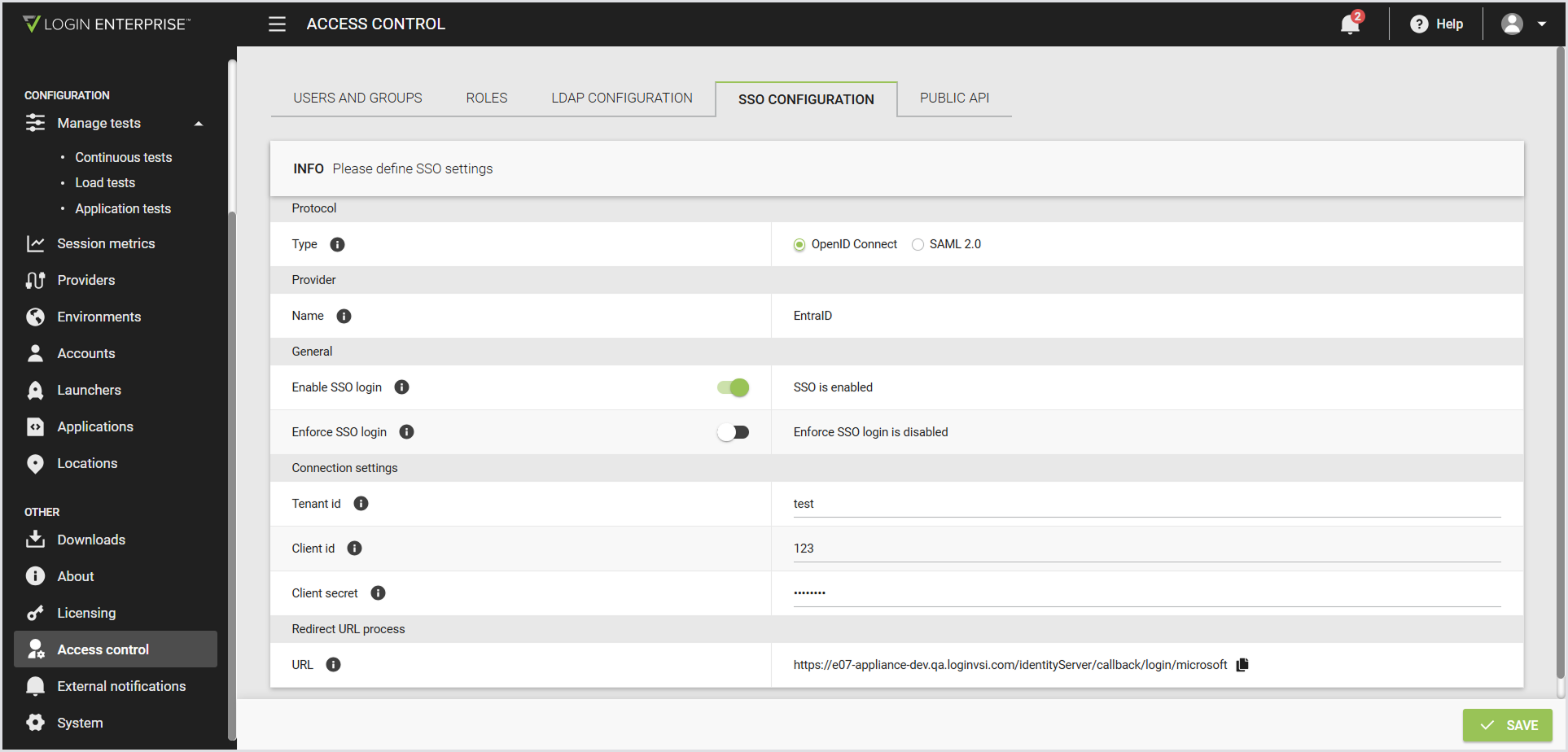
In the Login Enterprise sidebar menu, navigate to Access Control > SSO configuration.
-
Configure the following:
|
Protocol |
|
|---|---|
|
Type |
The protocol used for SSO. For SSO, select the OpenID Connect radio button. |
|
Provider |
|
|
Name |
The identity provider used for SSO. Only Microsoft Entra ID is supported. |
|
General |
|
|
Enable SSO login |
When disabled, the SSO login option isn’t available on the login page. |
|
Enforce SSO login |
When enabled, users can sign in only with SSO or an admin account. |
|
Connection settings |
|
|
Tenant ID |
The Microsoft Entra tenant (directory) ID to authenticate users. This value is a GUID and determines which directory is used for sign-in. |
|
Client ID |
The application (client) ID of the Microsoft Entra app for SSO. |
|
Client Secret |
The client secret for the Microsoft Entra app registration, used to authenticate the application. |
|
Enforce SSO login |
When enabled, users can sign in only with SSO or the local admin account. Enforcing SSO login prevents users from bypassing organizational sign-in policies by using local credentials. |
|
Redirect URL process |
|
|
Redirect URL |
The Login Enterprise-generated URL that Microsoft Entra uses to redirect users after successful sign-in. It cannot be edited in the Login Enterprise, but can be modified when pasting it into the Microsoft configuration. You can add multiple URLs in Microsoft if needed for multiple domains. |
-
Save the configuration.
Testing the Configuration
To verify that OIDC authentication is configured correctly:
-
Sign out of Login Enterprise.
-
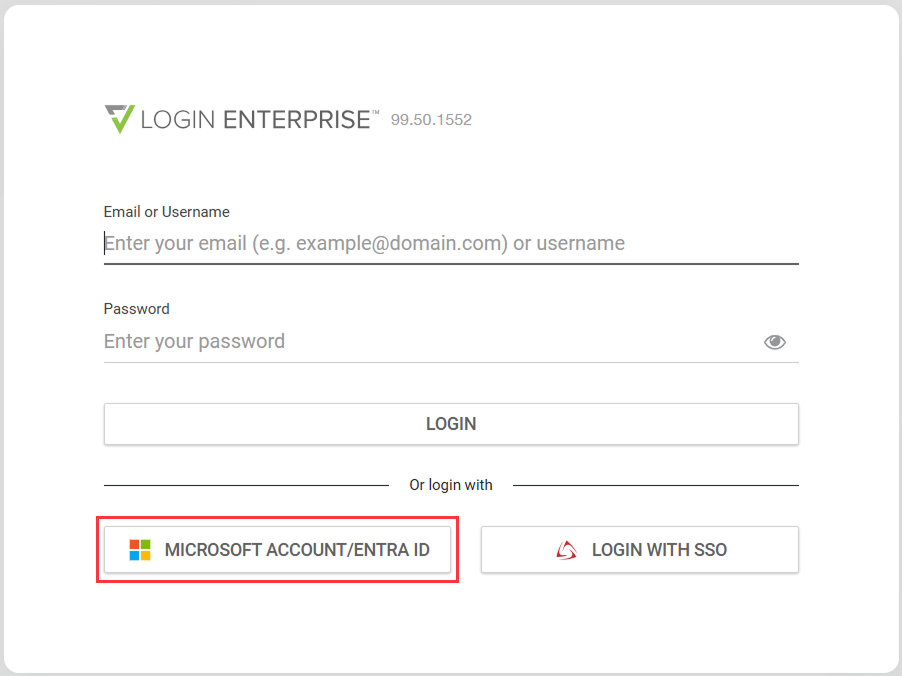
Select an identity provider login option, e.g, Microsoft Account/Entra ID, on the login page.
-
Optionally, confirm that you’re assigned the correct roles based on LDAP group membership.
Note: If the redirect URL is misconfigured, sign-in may fail. Ensure that the redirect URL configured in Microsoft Entra matches the Redirect URL process field in the Login Enterprise.
Break-Glass Access
The local admin account remains available even when OIDC authentication is enabled and enforced. This account provides break-glass access in case OIDC authentication is unavailable or misconfigured.