
Overview
Windows 365 Management is disabled by default. To access Windows 365 UI in the Hydra platform, you must first enable the functionality globally and then enable it for each tenant you want to manage. The Windows 365 UI remains hidden until both steps are completed.
Enable Windows 365 Management in Global Settings
-
In the top-right corner of the Hydra platform, click your profile icon.
-
Select Global Settings from the drop-down menu.
-
Under Features, select the checkbox Enable Windows 365 Management.
-
Reload the Hydra page to apply the change.

This global setting activates Windows 365 capabilities across the Hydra platform. Tenant-specific settings depend on this being enabled.
Enable Windows 365 Management for Each Tenant
-
In the left-hand navigation menu, select Tenants.
-
Choose the tenant you want to configure.
-
Select the checkbox Enable Windows 365 management.
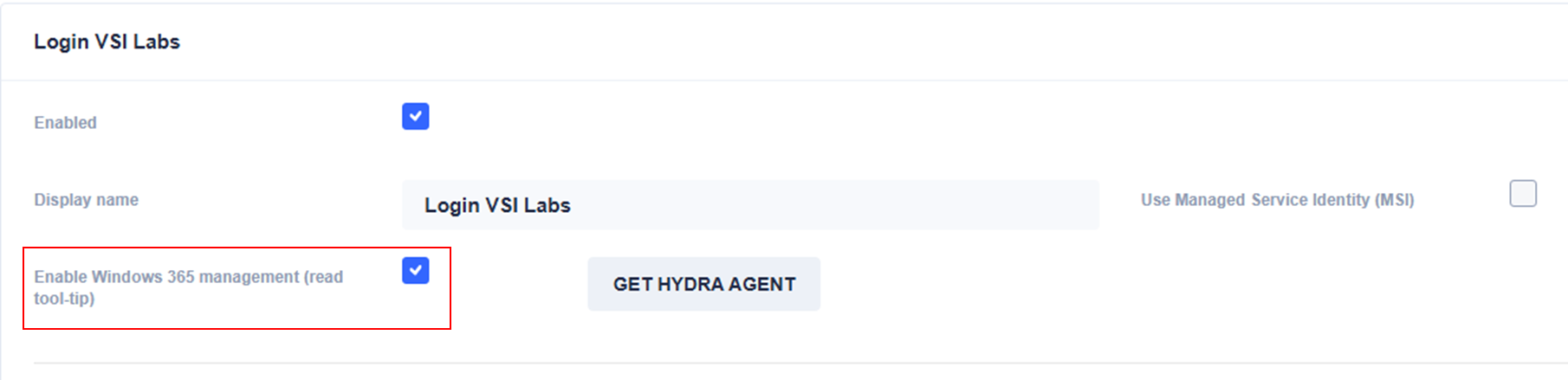
This step enables Windows 365 features specifically for the selected tenant. Each managed tenant must be enabled individually.
Enable Graph API Permissions for Cloud PCs
Allow Hydra to perform actions on Cloud PCs. Hydra can perform actions on Cloud PCs, like Intune Sync, Reprovision, Restart, Restore, and more. To allow that, add the following permission:
|
Part |
Value |
|
API |
Microsoft Graph |
|
Type |
Application |
|
Permission |
CloudPC.ReadWrite.All |
This permission is valid for all Cloud PCs. Use it carefully and monitor your environment. Use private endpoints for Hydra and disable public access to the Hydra app service if possible.
To enable more fine-grained permissions against specific Cloud PCs, you can use Administrative Units. For more information, see Adding Administrative Permissions.
Once these requirements are met, the Windows 365 Management sections (Admin Dashboard, All Cloud PCs, Provisioning Policies, Migration Snapshots, etc.) become visible and functional.