
Overview
The Admin Dashboard provides an overview of Windows 365 provisioning activity and Cloud PC usage across all tenants where Windows 365 Management is enabled.
Use the search field at the top to search for a provisioning policy name to quickly locate the policy you want to review.
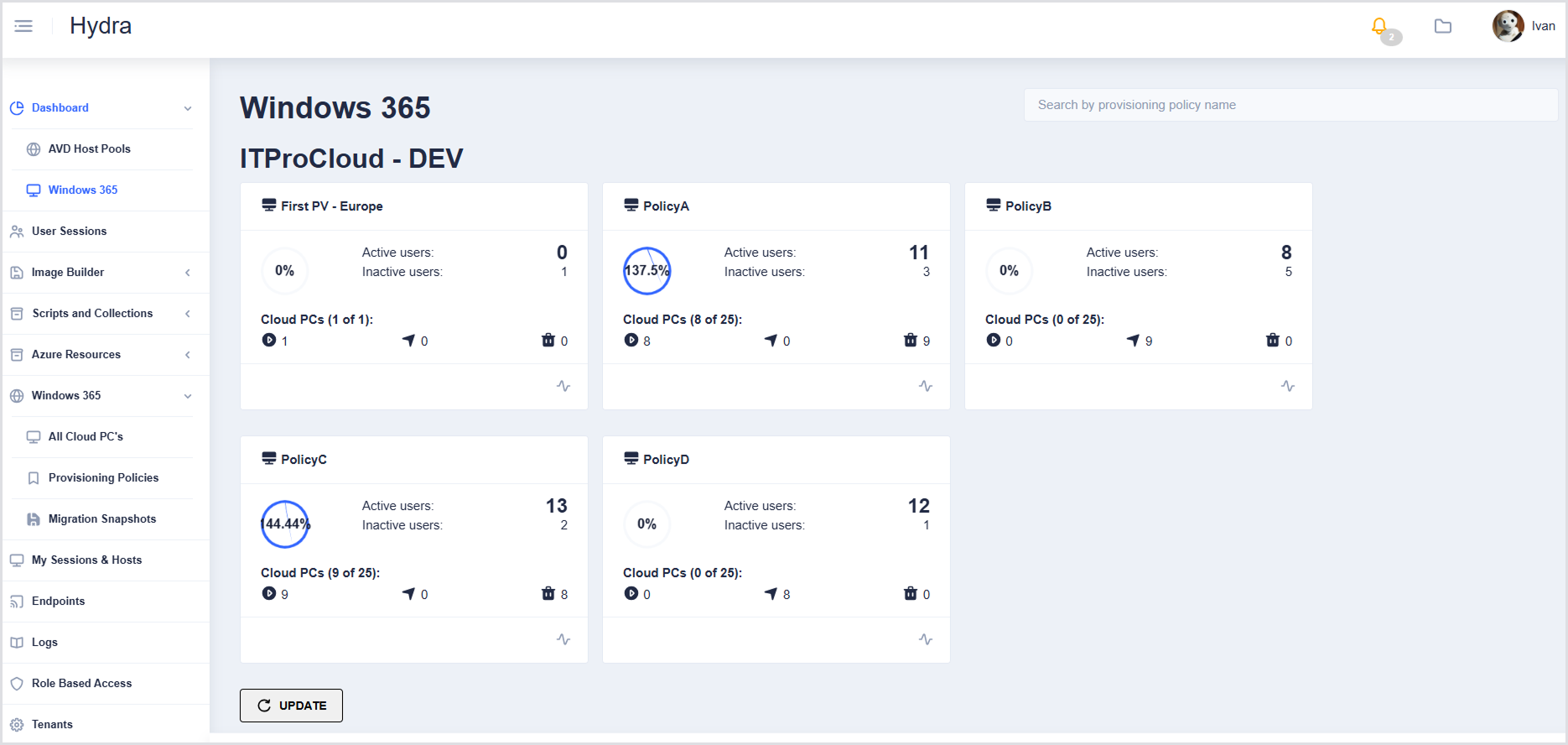
Provisioning Policy Tile Details
|
Field |
Description |
|---|---|
|
Policy Name |
Name of the provisioning policy (e.g., PolicyA). |
|
Circular icon |
Percentage of provisioned Cloud PCs with an active user, as reported by the Hydra Agent. |
|
Active Users |
Number of Cloud PCs where the Hydra Agent is installed and currently importing activity. |
|
Inactive Users |
Number of Cloud PCs where the Hydra Agent is installed, but no activity is reported. |
|
Cloud PCs (Status Counts) |
Shows Cloud PCs in different states:
Example: 8 of 25 Cloud PCs are provisioned. |
Clicking any part of a tile (policy name, percentages, counts, or status icons) navigates to All Cloud PCs for that policy, where more detailed management and actions are available.