.png)
SAP Web
Disclaimer
This workload is provided as-is and might need further configuration and customization to work successfully in each unique environment. For further Professional Services-based customization, please consult with the Login VSI Support and Services team. Please refer to the Application Script Recording for further self-help information regarding workload crafting and implementation.
For more information, refer to the top of the .cs file under Additional Resources.
Overview
This is a workload using Selenium web drivers and associated Login Enterprise meta-functions introduced in Login Enterprise v4.1. For details on the browser function, consult Browser Functions.
This workload will perform the following interactions:
Start the defined web browser.
Navigate to the defined SAP URL.
Enter the defined login credentials.
Click on the login button and measure the login time.
Create a new customer project:
Click the Plan Customer Projects tile.
Fill out the customer details with defined information.
Fill out the account details with the defined information.
Click Save
Go back to the Customer Projects page
Delete the project.
Close out of the web browser.
Once the workload script is implemented into the Login Enterprise virtual application and the test is running, it will produce results on the Login Enterprise dashboard and the Test Results page. For more information on configuring applications and application groups, see Configuring Applications for Testing.
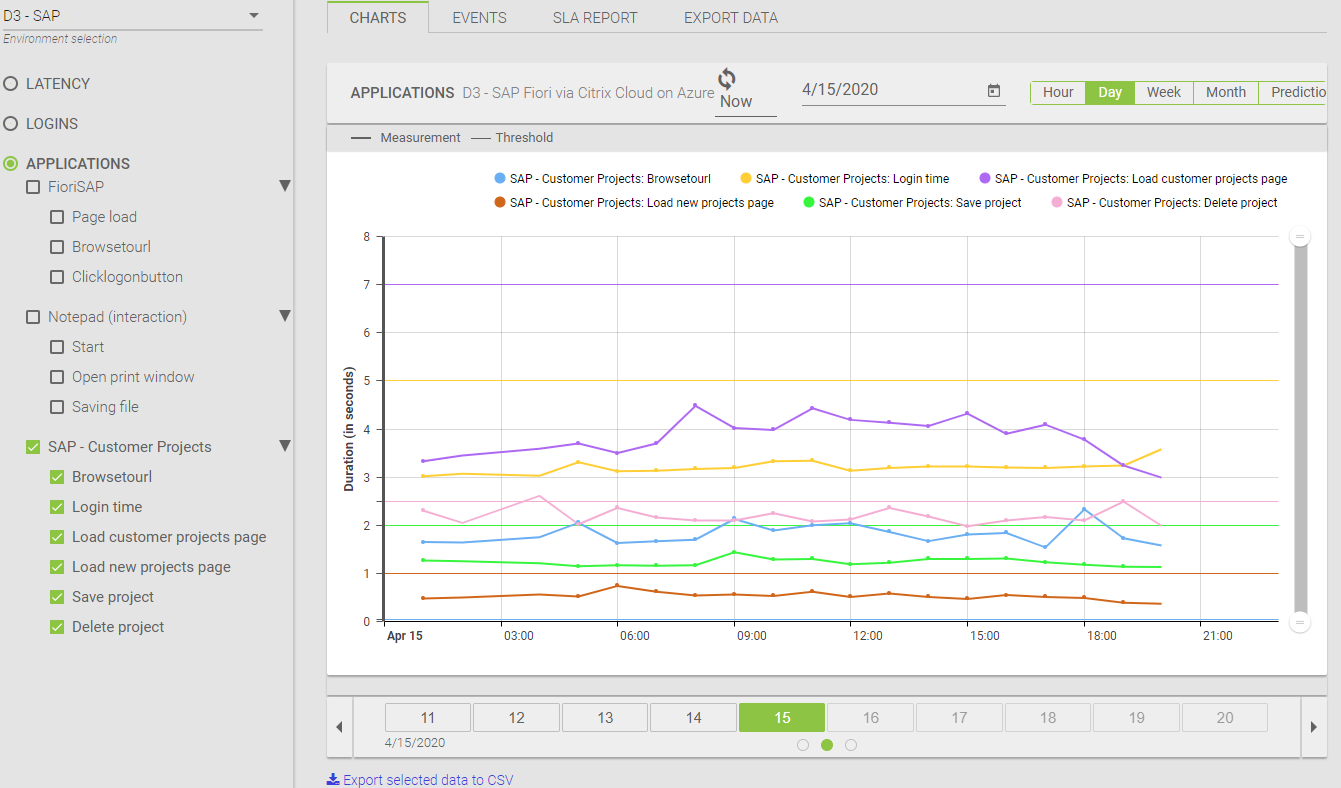
The following screenshots are examples of two different environments running the same workload but generating different timing results of interactions with the SAP web app. These can be compared against one another:

Demonstration Video:
https://youtu.be/Fr_K5emXHT8?feature=shared
The Login Enterprise Virtual user interacting with a web-based version of SAP.