
Overview
Custom Connector Packages let you store the scripts and binaries required by a custom connector in Login Enterprise. Instead of manually placing and maintaining them on each Launcher, an administrator uploads a named ZIP package once and selects it in the Test configuration. When the Test runs, the Launcher automatically downloads the package and uses its contents to run the custom connector.
Using a package is optional. If no package is selected, the custom connector continues to run as it did before, with the required files maintained manually on the Launcher. Tests created before v6.9 have no package selected and continue to run unchanged. To use a Custom Connector Package, the Launcher must be running v6.9 or later.
Managing Custom Connector Packages
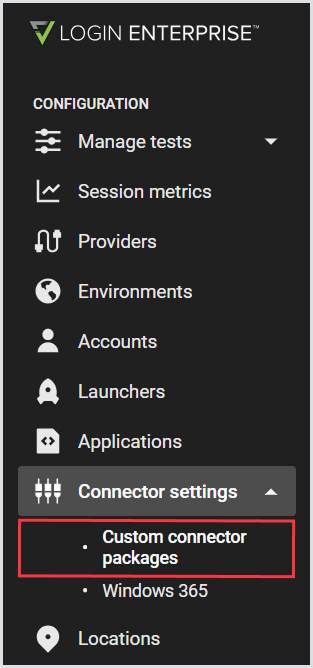
Custom connector packages are managed in the Login Enterprise sidebar menu > Connector settings > Custom connector packages.
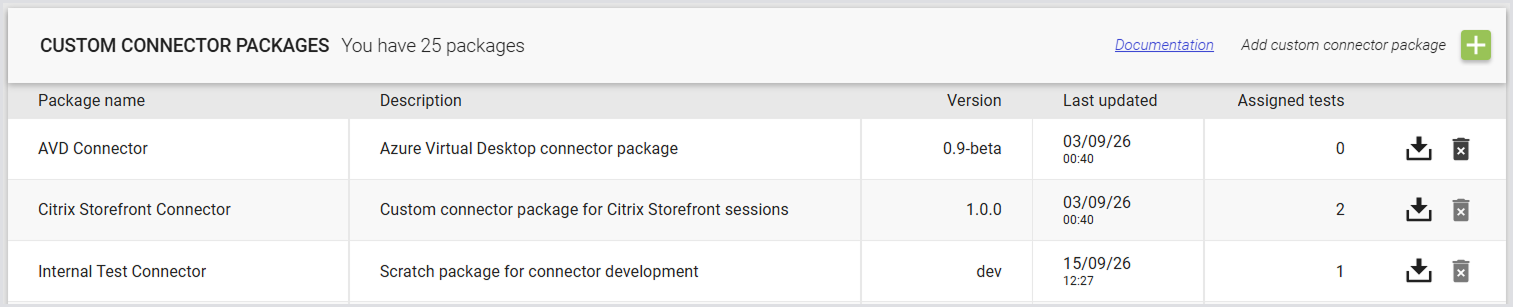
The page lists the packages available for custom connectors. For each package, you can view its Name, Description, Version, Last updated date, and the Tests assigned to it.
From the page, you can:
-
Select a package to view or edit its settings.
-
Download a package.
-
Delete a package.
To add a new package, see Add a Custom Connector Package.
Note: You can also manage Custom Connector Packages using the Public API.
Adding a Custom Connector Package
-
To add a new custom connector package, click “+“ in the top right to add a custom connector package:

-
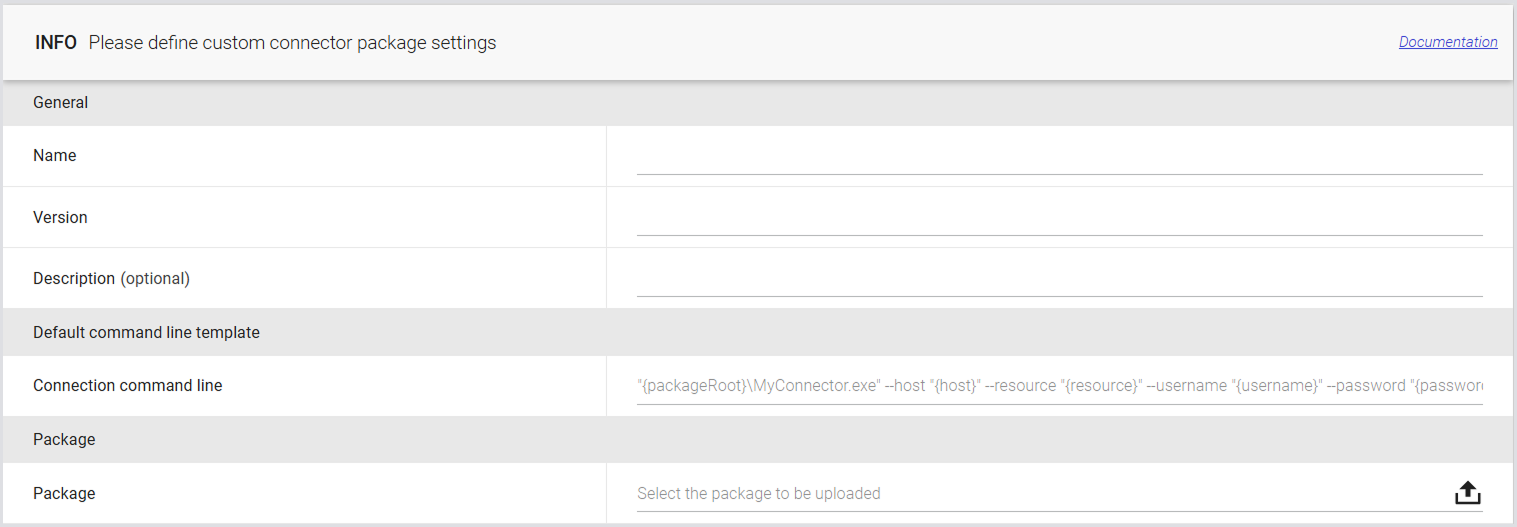
Define the custom connector package settings:
|
General |
|
|---|---|
|
Name |
A unique name that identifies the package. |
|
Version |
The package version. You can enter any text; there are no format requirements. |
|
Description (optional) |
An optional description of the package. |
|
Default command line template |
|
|
Connection command line |
The command line used to start the custom connector. For more information, see Connection Command Line. Note: If you select a different package, the command line will be overwritten. |
|
Package |
|
|
Package |
Upload the ZIP file containing the scripts or binaries required by the connector. The maximum file size is 256 MB. |
-
Click Save to apply the changes.
Package Storage and Access
When a Test that uses the package runs, the Launcher downloads and extracts the package to the following folder under the user profile:
%LOCALAPPDATA%\LoginEnterprise\Launcher\ConnectorPackages\<package ID>
Because the package is stored under the user profile, the Launcher does not require local admin rights to access it.
Use {packageRoot} in a custom connector command line to refer to the folder where the package is extracted. The variable resolves to the package folder when the Test runs.
Best Practices and Considerations
-
The first Test run that uses a package on each Launcher takes longer: When a Test uses a package for the first time on a Launcher, or after the package has been changed, the Launcher downloads the package. The download time is included in the login time and appears as a spike in the Continuous Test results for the first run. The spike size can vary depending on the package size and the system, such as network speed and disk performance.
-
To avoid including the download time in your results, allow the Test to run until the package has been downloaded by every Launcher that will run it. Ignore those initial results, and then run the Test again.
-
-
Keep packages small: Include scripts and small files in the package. Install runtimes such as Python and PowerShell directly on the Launcher instead. Login Enterprise does not enforce this recommendation.
-
The connection timeout includes package download and extraction: A custom connector has five minutes to establish a connection. Downloading and extracting the package take place within this five-minute window. This is existing behavior and is not new for custom connector packages.
-
A package contains one set of files: Uploading a new ZIP file replaces the existing package contents. The new contents take effect the next time each Test that uses the package runs.
-
Packages in use have editing restrictions: You can't delete a package while it is assigned to a Test, including a disabled or running Test. You also can't edit a package while a Test that uses it is running.
-
Folders for previous packages remain on the Launcher: When you update a package, the folders containing its previous contents aren't removed from the Launcher. There is currently no cleanup mechanism for these folders.
-
The uploaded file must be a valid ZIP file. Other file types do not pass validation: Login Enterprise checks that the uploaded file is a valid ZIP file. It does not validate the package contents. Password-protected or encrypted ZIP files are not supported.
-
List management is limited: Sorting, filtering, and paging for the Custom Connector Packages page aren't yet supported.
Additional Resources
-
For information on Custom Connectors, see the Custom Connector.
-
For details on creating and configuring Tests, see, e.g., Configuring Continuous Testing.
-
For RBAC rules for Custom Connector Packages, see Managing Roles and Permissions.