
Prerequisites
Endpoint management is currently in public preview and can be used to manage Windows 10 and 11 physical and Cloud PCs. Endpoint Management utilizes the Hydra Agent, and the following prerequisites must be enabled:
-
Web sockets must be enabled. For details, see the Hydra Agent instructions.
-
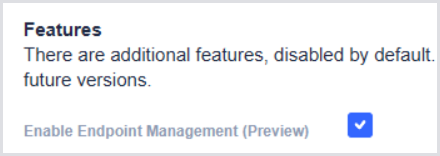
Endpoint Management must be enabled under Global Settings:
Installation
-
Download the agent from your Hydra instance: https://<your-instance>.azurewebsites.net/helpers/HydraAgent.zip
-
Get the secret for the Hydra agent in the Hydra portal: Endpoints -> Get the secret for the Hydra Agent
-
Bring the HydraAgent.exe into a folder on the endpoints (e.g., C:\Program Files\Hydra Agent for Endpoints)
-
Start the installation with admin permissions: HydraAgent.exe -u wss://<your-instance>.azurewebsites.net/wsx -s <YourHydraAgentSecret> --EndpointMode -i
You can also utilize Scripts or Intune to deploy the Hydra Agent.
Restrictions and Configuration
Some actions on the endpoints are restricted by default and must be enabled. Set the following reg values to allow the specific actions: Set-RegistryKey -Key Path: HKLM\SOFTWARE\ITProCloud\HydraAgent
-
Allow remote update of the agent Allow-UpdateAgent, DWord, Value 1
-
Allow remote reboot of the endpoint Allow-Reboot, DWord, Value 1
-
Allow remote shutdown of the endpoint Allow-Shutdown, DWord, Value 1
-
Allow remote running a script on the endpoint Allow-RunScript, DWord, Value 1