.png)
Scheduled Test Stuck at "Logging On Users"
Overview
After starting a Test on a Login Enterprise appliance in Azure, scheduled Tests get stuck at “logging on users” indefinitely.
When looking at the Container Status page, services needed for the Appliance to function properly are not started. The following behavior can be seen on the container status page.
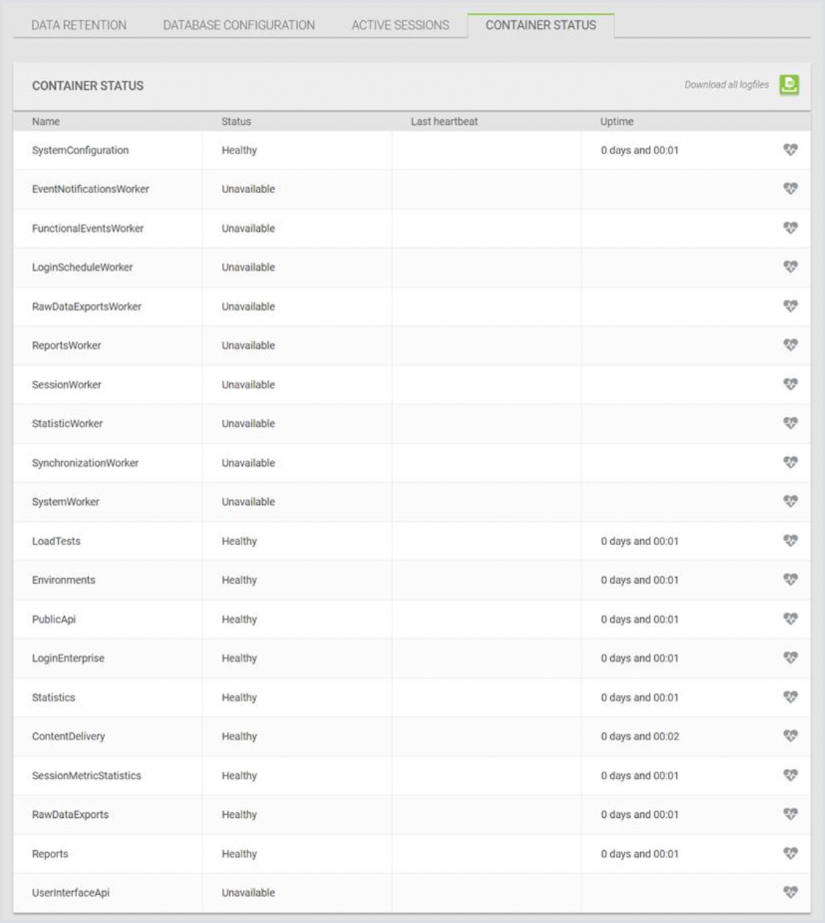
Solution
If this happens, please check your VM size in Azure. Please make sure that the machine has the minimum amount of required resources according to the System Requirements.
The default VM size is Standard_DS1_v2 (1vCPU/3.5GB RAM) unless the --size parameter is specified. The Login Enterprise Appliance requires a minimum of 4vCPU/8GB RAM for the VM. For more information, see Deploying the VHD to Microsoft Azure.